Sunday, March 29, 2020

JAVA Programming - 2.3 Array

1. What is JAVA array?
In JAVA, an array is a container object that holds a fixed number of values of a single type. The length of an array is established when the array is created. After creation, its length is fixed.

2. What are valid declaration of JAVA array?
int a[5]; 
int a[]=new int[];
int a[]=new int[5];
int a[]=new int[-5];
int a[]=new int[0];
int[] a=new int[5];
int []a=new int[5];

Answer:
int a[5];
Invaild - Compilation error. Because in JAVA , there  is no permenant memory allocation
int a[]=new int[];
Invalid - Compilation error due to array size is not given.
int a[]=new int[5];
Valid declaration, no error
int a[]=new int[-5];
Valid declaration, but NegativeArraySizeException throws during run time
int a[]=new int[0]; // Empty array
Valid declaration, no error
int[] a=new int[5];
Valid declaration, no error
int []a=new int[5];
Valid declaration, no error

3. What will be the output of the below JAVA code?

class Learn{
public static void main(String[] args){
int a[]={1,2,3,4,5};
System.out.println(a);
}
}

Output:
[I@18ef96

Explanation:
Array name represents base address or reference of the array. In JAVA, classname@hashcode represents the reference of an array.
  • The string “[I” is the run-time type signature for the class object “array with component type int“.
  • The only direct superclass of any array type is java.lang.Object.
  • The string “[B” is the run-time type signature for the class object “array with component type byte“.
  • The string “[S” is the run-time type signature for the class object “array with component type short“.
  • The string “[L” is the run-time type signature for the class object “array with component type of a String Class”. The Class name is then followed.
  • The string “[Z” is the run-time type signature for the class object “array with component type of boolean”. The Class name is then followed.
  • The string “[J” is the run-time type signature for the class object “array with component type of long”. The Class name is then followed.

4. What will be the output of following JAVA code?
public  class Learn{  
    static int[] add(){  
return new int[]{1,2,3,4};  
}  
public static void main(String args[]){  
int a[]=add();  
System.out.println("Array returned by add()"); 
DisplayArray(a);
System.out.println("Anonymous array"); 
DisplayArray(new int[]{11,22,33});
}
static void DisplayArray(int x[]){
for(int i=0;i<x.length;i++)  
System.out.println(x[i]); 
}
Output:
Array returned by add()
1
2
3
4
Anonymous array
11
22
33

5. What will be the output of the following JAVA program?
class LWD{
    public static void main(String l[]){
int a[][]={{11,22,33},{44,55}};
System.out.println(a);
System.out.println(a[0]);
}
}
Output & Explanation:
[[I@18ef96
[I@6956de9

[[I@18ef96 → base reference id(classname@hasecode) of two dimensional array a.
[I@6956de9→ first row reference id(classname@hasecode) of array a.

6. Find the valid statement to declare two dimensional array.
int[][] a,b;
int a[][],b[][];
int[] []a,b;
int[] []a,[]b;

Answer & Explanation:
int[][] a,b → valid; a and b both are 2D array.
int a[][],b[][] → valid; a and b both are 2D array.
int[] []a,b → valid; a and b both are 2D array.
int[] []a,[]b → Compile time error; If dimension is specified before variable only applicable for the first variable.

7. Find the valid declaration of array size.
int[] W=new int['a'];
short s=10;
int[] X=new int[s];
byte b=20;
int[] Y=new int[b];
long j=10;
int[] Z=new int[j];

Answer & Explanation:
int[] W=new int['a']; →valid;
short s=10;
int[] X=new int[s]; →valid;
byte b=20;
int[] Y=new int[b];→valid;
long j=10;
int[] Z=new int[j];→Invalid;

Array size declaration only possible in the range of char, byte, short and integer; So long variable is not possible for array size declaration.

8. Which are valid declaration of array dimension?
int a[][]=new int[3][3];
int a[][]=new int[][3];
int a[][]=new int[3][];
int a[][]=new int[][];
Answer & Explanation:
int a[][]=new int[3][3];→valid; 3 rows and 3 columns
int a[][]=new int[][3];→Invalid; Row dimension is not declared, array size should have atleast base(row) size.
int a[][]=new int[3][];→valid; row size has mentioned.
int a[][]=new int[][];→Invalid; base size is not mentioned.
PREVIOUS     NEXT

Saturday, March 28, 2020

JAVA Programming - 2.2 Data types - String

1. How many different way to create String object?

There are three different way to create the String object as follow:
  • By converting Char array to String 
  • By String literal
  • By new keyword

2. What is String Constant Pool (SCP) in Java?

String constant pool is a pool of String literal objects stored in Java heap memory.It doesn’t create a new instance if the string already exist in the string constant pool. String objects using new operator are stored in direct heap memory not in the String pool.
For example,
String s1="Durga";
String s2="Durga"; // Doesn't create a new instance
String s3=new String("Durga"); //creates a new instance 

String s1 and s2 stores string object "Durga" in one particular location of String pool but String s3 uses new operator even the string object already present in the string pool it creates the new instance in direct heap memory.


3. Why String objects immutable in JAVA?

The string is immutable in Java because String objects are cached in String pool. Since cached String literals are shared between multiple clients, there is always a risk, where one client's action would affect all another client.

4. How many different methods to compare String in JAVA?

  • compareTo() method - used to compare during sorting operation.
  • == operator -  used to compare the reference matching.
  • equals() method - used to compare value during authentication.

5. What will be the output of following JAVA code?
class String_1{
public static void main(String args[]){
String s1="Yoga";
String s2=new String("Yoga");
String s3="YOGA";
System.out.println(s1.equals(s2)); 
System.out.println(s1==s2);
System.out.println(s1.equals(s3));
System.out.println(s1==s3);
System.out.println(s1.equalsIgnoreCase(s3)); 
}
}

Output:

true
false
false
false
true
Explanation: equals() method compares the objects value and == compares the object reference. Even though s1 and s2 have same value, s1 is string literal which stored in string pool and s2 uses new operator stored in heap memory.   

6. What will be the output of following JAVA code?
class String_2{
public static void main(String args[]){
String s1="health";
String s2="health";
String s3="Health";
String s4="";
String s5="he";
String s6="we";
System.out.println(s1.compareTo(s2)); 
System.out.println(s1.compareTo(s3));
System.out.println(s3.compareTo(s1));
System.out.println(s5.compareTo(s4));
System.out.println(s4.compareTo(s5)); 
System.out.println(s5.compareTo(s1)); 
System.out.println(s6.compareTo(s1));
}
}
Output:
0
32
-32
2
-2
-4
15
Explanation: 
s1.compareTo(s2) - returns 0 both are equal
s1.compareTo(s3) - returns 32 s1 greater than s2 (ASCII value distance between them)
s3.compareTo(s1) - returns -32 s1 lesser than s2 (ASCII value distance between them)
s5.compareTo(s4) - returns 2 s5 empty string compares the length of s4.
s4.compareTo(s5) - returns -2 length of s5 compares the s4 null string.
s5.compareTo(s1) - returns -4 s5 string length compares length of s1 after comparing character sequence.
s6.compareTo(s1) - returns 15 s6 compares ASIIC distance between first differed character of s1.


7. Find the output of following JAVA code.
class String_3{
public static void main(String args[]){
String s1="Learn with";
String s2=" Durga ";
System.out.println(s1+s2);
System.out.println(10+100+s2+100+10);
System.out.println(s1.concat(s2));
}
}
Output:
Learn with Durga
110 Durga 10010
Learn with Durga
Explanation:
System.out.println(s1+s2); // "+" concatenate String s1 and s2
System.out.println(10+100+s2+100+10);  // "+" starts with integer addition results 110; now integer and string addition change "+" arithmetic operator into string concatenation results with string "110Durga "; After this change, "+" starts continue the string concatenation even integer value there in addition. 
System.out.println(s1.concat(s2)); // string s2 added at the end of string s1


8. Find the output of following JAVA code.
class String_4{
public static void main(String args[]){
String s1="Learn with";
String s2=" Durga ";
char s3[]=new char[5];
String s4="Durga";
System.out.println(s1.substring(1));
System.out.println(s1.substring(1,5));
System.out.println(s2.charAt(1));
s1.getChars(1,5,s3,0);
System.out.println(s3);
s1.getChars(0,5,s3,0);
System.out.println(s3);
System.out.println(s1.contains("ear"));
System.out.println(s2.startsWith("D"));
System.out.println(s2.endsWith("A "));
System.out.println(s2.startsWith(" D"));
System.out.println(s2.endsWith("a "));
System.out.println(s4.toLowerCase());
System.out.println(s4.toUpperCase());
System.out.println(s1+s2);
System.out.println(s1+s2.trim());
System.out.println(String.join("#",s1,s2));
}
}

Output:
earn with
earn
D
earn
Learn
true
false
false
true
true
durga
DURGA
Learn with Durga
Learn withDurga
Learn with# Durga

Explanation:
s1 = "Learn with"
s2 = " Durga "
s3 // char array of size 5
s4 = "Durga"
s1.substring(1) → substring of s1 starts from starting index 1 → earn with
s1.substring(1,5) → substring of s1 starts from 1 and end excluding ending index 5 → earn
s2.charAt(1) → character in 1st index of string s2 → D
s3=s1.getChars(1,5,s3,0) → substring copied from s1 in range of index(1,5) to char array s3 → earn 
s3=s1.getChars(0,5,s3,0) substring copied from s1 in range of index(0,5) to char array s3 →Learn 
s1.contains("ear") → checks substring "ear" present or not in s1 →true
s2.startsWith("D") → checks string s2 starts with character "D" or not → false // because its starts with space.
s2.endsWith("A ") checks string s2 ends with character "A" or not → false // because its ends with lower case "a ".
s2.startsWith(" D") checks string s2 starts with character " D" or not → true // because its starts with space.
s2.endsWith("a ") checks string s2 ends with character "a " or not → true // because its ends with lower case "a ".
s4.toLowerCase() → changes upper case into lower case → durga
s4.toUpperCase() → changes lower case into upper case → DURGA
s1+s2 → concatenate s1 and s2 before trim → Learn with Durga
s1+s2.trim() →concatenate s1 and space removed at ends of s2 → Learn withDurga
String.join("#",s1,s2) → joins s1 and s2 with symbal "#" → Learn with# Durga


PREVIOUS              NEXT

Wednesday, March 25, 2020

JAVA Programming - 2.1 Data types and Variables

1. What is Datatype and its function?

It is a type of data which tells the compiler to store and use the value. A string, for example, is a data type that is used to classify text and an integer is a data type used to classify whole numbers. The data type defines which operations can safely be performed to create, transform and use the variable in another computation.

2. What are the different types of JAVA datatype?


3. What are the default value and size of JAVA datatypes?

Data Type
Default Value
Default size
boolean
false
1 bit
char
'\u0000'
2 byte
byte
0
1 byte
short
0
2 byte
int
0
4 byte
long
0L
8 byte
float
0.0f
4 byte
double
0.0d
8 byte


4. Why char uses 2 bytes in JAVA?

In JAVA, char datatype uses Unicode system not ASCII code system. Characters in Java are indices into the Unicode character set. They are 16-bit values that can be converted into integers and manipulated with the integer operators, such as the addition and subtraction operators. The default char value in Java is \u0000.

5. What will be the output of following JAVA code?

class Widen{
public static void main(String[] args){
int a=10;
float f=a;
                System.out.println(a);
                System.out.println(f);
}
}
 Output:
C:\Users\Durga>javac Tutorial_4.java
C:\Users\Durga>java Widen
10
10.0
Explanation:
Here, float variable is assigned with integer value implicitly. This is called data widening. 

6. What will be the output of following JAVA code?

class Narrow{
public static void main(String[] args){
float f=10.5f;
//int a=f;//Compile time error
int a=(int)f;
System.out.println(f);
System.out.println(a);
}
}
 Output:
C:\Users\Durga>javac Narrow.java
C:\Users\Durga>java Narrow
10.5
10
Explanation:
If integer variable is assigned with the float value implicitly, then it will shows an compilation error due to down casting of data type. Down-casting is not directly possible in Java, so type conversion done by explicitly.

7. What will be the output of following JAVA code?

class Learn{
public static void main(String[] args){
int a=131;
byte b=(byte)a;
System.out.println(a);
System.out.println(b);
}
}
Output:
C:\Users\Durga>javac Test.java
C:\Users\Durga>java Learn
131
-125
Explanation:
In Java, byte value ranges from -128 to +127. Here, overflow range of byte value again starts assign value from -128 instead of 128. So the byte value of 131 becomes -125.

8. Automatic type conversion in Java takes place when
A. Two type are compatible and size of destination type is shorter than source type.
B. Two type are compatible and size of destination type is equal of source type.
C. Two type are compatible and size of destination type is larger than source type.
D. All of the above

Answer: Option C


9.What will be the output of following JAVA code?

class Learn{
public static void main(String[] args){
byte a=10;
byte b=10;
byte c=a+b;
System.out.println(c);
}
}

Output:
Compilation error

Explanation:
Compile Time Error: due to incompatible types, possible lossy conversion from int to byte
because a+b=20 will be int even a and b are byte values. In order to avoid this, we need to do explicit conversion as follow: //byte c=(byte)(a+b);

🔙PREVIOUS - JAVA Programming - 1.2 Introduction to basic interview questions
🔜NEXT - JAVA Programming - 2.2 Data types - String


Sunday, March 8, 2020

JAVA Programming - 1.2 Introduction to basic interview questions

1. What are the basic terminology of Simple JAVA program?
  • class keyword is an user defined datatype.
  • public keyword is an access modifier which represents visibility
  • static is a keyword, if we declare any method as static, it is known as static method. The core advantage of static method is that there is no need to create object to invoke the static method. The main method is executed by the JVM, so it doesn't require to create object to invoke the main method. So it saves memory.
  • void is the return type of the method.
  • main represents the starting point of the program.
  • String[] args is used for command line argument.
  • System.out.println() is used print statement.

2. What are all the different ways to declare the main() method?
  • static public void main(String args[])
  • public static void main(String[] args)
  • public static void main(String []args)
  • public static void main(String args[])
  • public static void main(String... args)
class A{
static public void main(String... args){
System.out.println("Learn with Durga");
}
};

Note: Invalid java main method signature 
public void main(String[] args)
static void main(String[] args)
public void static main(String[] args)
abstract public static void main(String[] args)

3. What will happened to Java file during Compilation time and Run time?

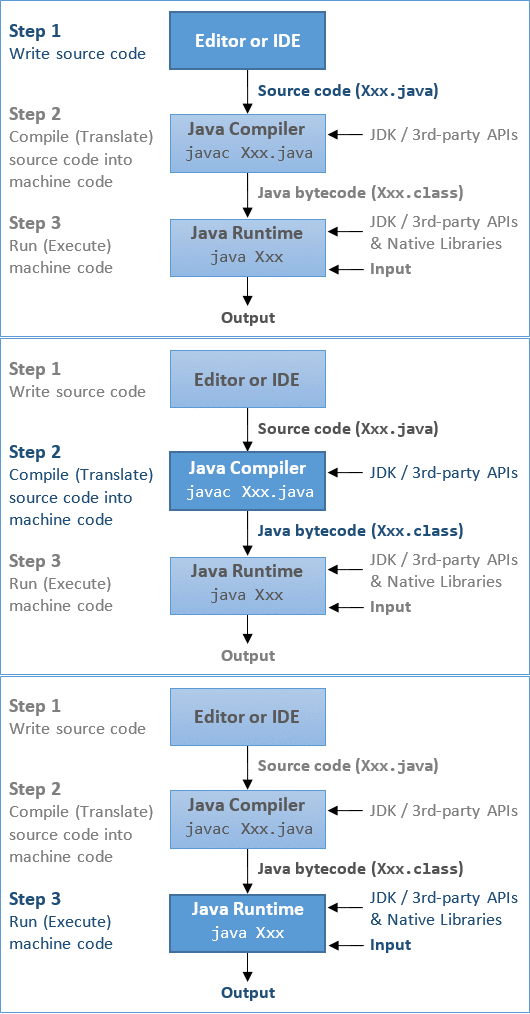
During compilation time, java file is compiled by Java Compiler that does not interact with OS and converts the java code into byte code.

Image result for during run time of java file execution


During run-time, 
  • Class-loader: subsystem of JVM that is used to load class files.
  • Bytecode Verifier: Checks the code fragments for illegal code that can violate access right to objects.
  • Interpreter: reads bytecode stream then execute the instructions.


4. Can Java file name and class name be different?

Yes, if the class is not a public.

For example, the java code save as Tutorial_1.java with the class name of India where public keyword not used.

 class India{
public static void main(String arg[]){
System.out.println("Welcome to learn");
}

Output:
C:\Users\Durga>javac Tutorial_1.java
C:\Users\Durga>java India
Welcome to learn

The same java code with public keyword,
public class India{
public static void main(String arg[]){
System.out.println("Welcome to learn");
}
}
Output:
C:\Users\Durga>javac Tutorial_1.java
Tutorial_1.java:1: error: class India is public, should be declared in a file named India.java
public class India{
       ^
1 error

In order to overcome this, if the class is declared as public, then the file name and class name should be same.

5. How many public classes can a Java code have?

As we have seen in the previous question that whenever public keyword is used for the class, then file name should also be same as class name. So, if multiple classes are declared as public keyword, then there will be a confusion while assigning the file name.

6. How many main() methods can a Java code have?

Java program may have zero or as many as the number classes of main() method. If there is no main() method, program gets compiled successfully, during run-time it shows an error called main() method not found. If program has multiple main() methods, the required main method can be called with respective class name.

For example, the below Java program has three classes and main() methods.
class China{
public static void main(String arg[]){
System.out.println("Welcome to China");
}
}
class US{}
class India{
public static void main(String arg[]){
System.out.println("Welcome to India");
}
}

Output:
C:\Users\Durga>javac India.java

C:\Users\Durga>java India
Welcome to India

C:\Users\Durga>java China
Welcome to China

C:\Users\Durga>java US
Error: Main method not found in class US, please define the main method as:
   public static void main(String[] args)
or a JavaFX application class must extend javafx.application.Application


7. Difference between JDK, JRE and JVM?


JVM: 
JVM (Java Virtual Machine) is an abstract machine. It is a specification that provides runtime environment in which java bytecode can be executed. JVMs are available for many hardware and software platforms. JVM, JRE and JDK are platform dependent because configuration of each OS differs. But, Java is platform independent. There are three notions of the JVM: specification, implementation, and instance.

The JVM performs following main tasks:
Loads code
Verifies code 
Executes code
Provides runtime environment

JRE:
JRE is an acronym for Java Runtime Environment. It is used to provide runtime environment. It is the implementation of JVM. It physically exists. It contains set of libraries + other files that JVM uses at runtime.

JDK :
JDK is an acronym for Java Development Kit. It physically exists. It contains JRE + development tools.


9. How many types of variable in JAVA?
1) Local Variable: A variable declared inside the method is called local variable.
2) Instance Variable: A variable declared inside the class but outside the method, is called instance variable . It is not declared as static.
3) Static variable: A variable which is declared as static is called static variable. It cannot be local.

For Example:
class Learn{
int data=50;//instance variable 
static int m=100;//static variable 
void method(){
int n=90;//local variable
}
}

PREVIOUS         NEXT

Sunday, March 1, 2020

JAVA Programming - 1.1 Introduction Basic interview questions


1. What is Java? 

 Java is a programming language and a platform introduced by Sun Micro-systems in 1995. Java is a high level, robust, secured and object-oriented programming language.


2. What is platform? Which platform Java is used?

Any hardware or software environment in which a program runs, is known as a platform. Since Java has its own runtime environment (JRE) and API, it is called platform. It is also called as WORA (Write Once Run Anywhere), supports different Operating System once program is stored in the .java extension.


3.Where it is used?
  • Desktop Applications such as acrobat reader, media player, antivirus etc. 
  • Web Applications such as irctc.co.in, javatpoint.com etc. 
  • Enterprise Applications such as banking applications. 
  • Mobile 
  • Embedded System 
  • Smart Card 
  • Robotics & Games etc

4. Java Platforms / Editions
  • Java SE (Java Standard Edition) 
  • Java EE (Java Enterprise Edition) - It is built on the top of Java SE platform. It includes topics like Servlet, JSP, Web Services, EJB, JPA etc. 
  • Java ME (Java Micro Edition) - It is a micro platform which is mainly used to develop mobile applications. 
  • JavaFx It is used to develop rich internet applications. It uses light-weight user interface API.

5. Types of Java Applications
  • Standalone Application
  • Web Application
  • Enterprise Application
  • Mobile Application

6. Java Version History 

There are many java versions that has been released.  Current stable release of Java is Java SE 10. JDK Alpha and Beta (1995) 
  • JDK 1.0 (23rd Jan, 1996) 
  • JDK 1.1 (19th Feb, 1997) 
  • J2SE 1.2 (8th Dec, 1998) 
  • J2SE 1.3 (8th May, 2000) 
  • J2SE 1.4 (6th Feb, 2002) 
  • J2SE 5.0 (30th Sep, 2004) 
  • Java SE 6 (11th Dec, 2006) 
  • Java SE 7 (28th July, 2011) 
  • Java SE 8 (18th March, 2014) 
  • Java SE 9 (21st Sep, 2017) 
  • Java SE 10 (20th March, 2018)

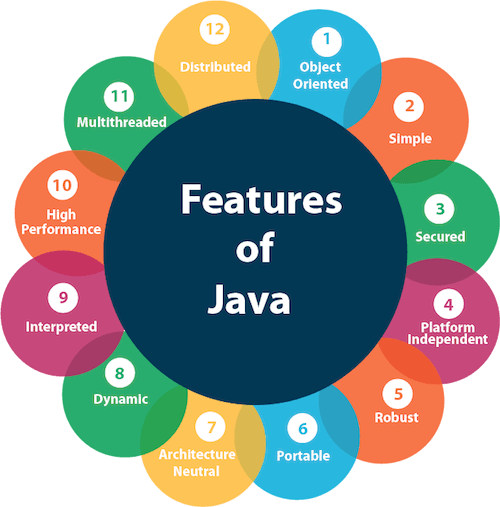
7. What are the features of JAVA?

Image result for features of java


1. Object-oriented: Java is Object-oriented programming language. Everything in Java is an object. -organize our software as a combination of different types of objects that incorporates both data and behavior -Object-oriented programming(OOPs) is a methodology that simplifies software development and maintenance by providing some rules 

2. Simple: Java is very easy to learn and its syntax is simple, clean and easy to understand. Removed explicit pointers, operator overloading etc. Automatic Garbage Collection in java. Basic concepts of OOPs are: (i) Encapsulation (ii) Abstraction (iii) Inheritance and (iv)Polymorphism 

3. Secured: Java is best known for its security. With Java, we can develop virus-free systems. Java is secured because:
(i) No explicit pointer
(ii) Java Programs run inside virtual machine sandbox

Classloader:
Classloader in Java is a part of the Java Runtime Environment(JRE)
which is used to dynamically load Java classes into the Java Virtual
Machine.

Bytecode Verifier:
It checks the code fragments for illegal code that can violate access right
to objects.

Security Manager:
It determines what resources a class can access such as reading and
writing to the local disk. 


4. Platform Independent: Java is platform independent because it is different from other languages like C, C++ etc. There are two types of platforms software-based and hardware-based. Java provides software-based platform. The Java platform differs from most other platforms in the sense that it is a software-based platform that runs on the top of other hardware based platforms.

It has two components:
  • Runtime Environment
  • API(Application Programming Interface)
Java code can be run on multiple platforms e.g. Windows, Linux, Sun Solaris, Mac/OS etc. Java code is compiled by the compiler and converted into bytecode. This bytecode is a platform-independent code because it can be run on multiple platforms i.e. Write Once and Run Anywhere(WORA).

5. Robust:
  • It uses strong memory management. 
  •  There are lack of pointers that avoids security problem.
  • There is automatic garbage collection in java.  
  •  There is exception handling and type checking mechanism in java.

6. Portable:  Java is portable because it facilitates you to carry the java bytecode to any platform.

7. Architecture-neutral: Java is architecture neutral because there is no implementation dependent features e.g. size of primitive types is fixed.

In C programming, int data type occupies 2 bytes of memory for 32-bit architecture and 4 bytes of memory for 64-bit architecture. But in java, it occupies 4 bytes of memory for both 32- and 64-bit architectures.

8. High-performance: Java is faster than traditional interpretation since bytecode is "close" to native code still somewhat slower than a compiled language (e.g., C++). Java is an interpreted language.

9. Multi-threaded: A thread is like a separate program, executing concurrently.

10. Distributed: Java is distributed because it facilitates us to create distributed applications in java. RMI and EJB are used for creating distributed applications.

8. Difference between C++ and JAVA.
Comparison Index
C++
Java
Platform-independent
C++ is platform-dependent.
Java is platform-independent.
Mainly used for
C++ is mainly used for system programming.
Java is mainly used for application programming. It is widely used in window, web-based, enterprise and mobile applications.
Goto
C++ supports goto statement.
Java doesn't support goto statement.
Multiple inheritance
C++ supports multiple inheritance.
Java doesn't support multiple inheritance through class. It can be achieved by interfaces in java
Operator Overloading
C++ supports operator overloading.
Java doesn't support operator overloading.
Pointers
C++ supports pointers. You can write pointer program in C++.
Java supports pointer internally. But you can't write the pointer program in java. It means java has restricted pointer support in java.
Compiler and Interpreter
C++ uses compiler only.
Java uses compiler and interpreter both.
Call by Value and Call by reference
C++ supports both call by value and call by reference.
Java supports call by value only. There is no call by reference in java.
Structure and Union
C++ supports structures and unions.
Java doesn't support structures and unions.
Thread Support
C++ doesn't have built-in support for threads. It relies on third-party libraries for thread support.
Java has built-in thread support.
Documentation comment
C++ doesn't support documentation comment.
Java supports documentation comment (/** ... */) to create documentation for java source code.
Virtual Keyword
C++ supports virtual keyword so that we can decide whether or not override a function.
Java has no virtual keyword. We can override all non-static methods by default. In other words, non-static methods are virtual by default.
unsigned right shift >>>
C++ doesn't support >>> operator.
Java supports unsigned right shift >>> operator that fills zero at the top for the negative numbers. For positive numbers, it works same like >> operator.
Inheritance Tree
C++ creates a new inheritance tree always.
Java uses single inheritance tree always because all classes are the child of Object class in java. Object class is the root of inheritance tree in java.